일기장처럼 편하게 쓰고있지만 잘못된 내용이 있다면 편하게 말씀해주세요.
피드백 감사드립니다.
1. 성별에 따라 분류해서 제출해보기
#필요한 라이브러리 import
import pandas as pd
from pandas import DataFrame

#파일을 읽어들인다.
train_csv = pd.read_csv('train.csv')
train_csv.shape
test_csv = pd.read_csv('test.csv')
test_csv.shape

#첫 다섯 줄을 보여줌
train_csv.head(5)
test_csv.head(5)

#test_csv를 복사해서 'Survived' 열을 0으로 초기화
test_sub = test_csv.copy()
test_sub['Survived'] = 0

#'Sex'열이 'female'인 행들은 'Servived'열을 1로 초기화
test_sub['Survived'][test_sub['Sex'] == 'female'] = 1
#'Sex'열이 'male'인 행들은 'Servived'열을 0으로 초기화(안해도 되지만 결측값이 있을 수도 있기 때문에 해줘야할 것 같다.)
test_sub['Survived'][test_sub['Sex'] == 'male'] = 0
test_sub.head(5)

#test_sub DataFrame에서 PassengerId, Survived 열만 추출해서 submission.csv 파일로 저장
test_sub.to_csv('submission.csv', columns=['PassengerId', 'Survived'], index = False)
배운것
csv파일 읽기 : pandas.DataFrame.read_csv()
데이터 프레임 크기확인 : pandas.DataFrame.shape
데이터 프레임 인덱싱 : test_sub['Survived'][test_sub['Sex'] == 'female'] = 1 이런 식으로 조건에 해당하는 행이나 열을 인덱싱 가능
특정 열 추출, csv 파일로 저장 : pandas.DataFrame.to_csv('파일명.csv', columns=['열1', '열2', ...], index=(True면 인덱스 포함, False면 인덱스 미포함))
2. 따라해보고 분석하기
www.kaggle.com/nadintamer/titanic-survival-predictions-beginner
Titanic Survival Predictions (Beginner)
Explore and run machine learning code with Kaggle Notebooks | Using data from Titanic: Machine Learning from Disaster
www.kaggle.com
1)Import Necessary Libraries & Read in and Explore the Data
#data analysis libraries
import numpy as np
import pandas as pd

#visualization libraries
import matplotlib.pyplot as plt
import seaborn as sns
#노트북을 실행한 브라우저에서 그래프를 바로 보여주도록 함
%matplotlib inline

#ignore warnings
import warnings
warnings.filterwarnings('ignore')

#import train and test CSV files
train = pd.read_csv('train.csv')
test = pd.read_csv('test.csv')

train.describe(include="all")

print(train.columns)

train.sample(5)
2)Data Analysis

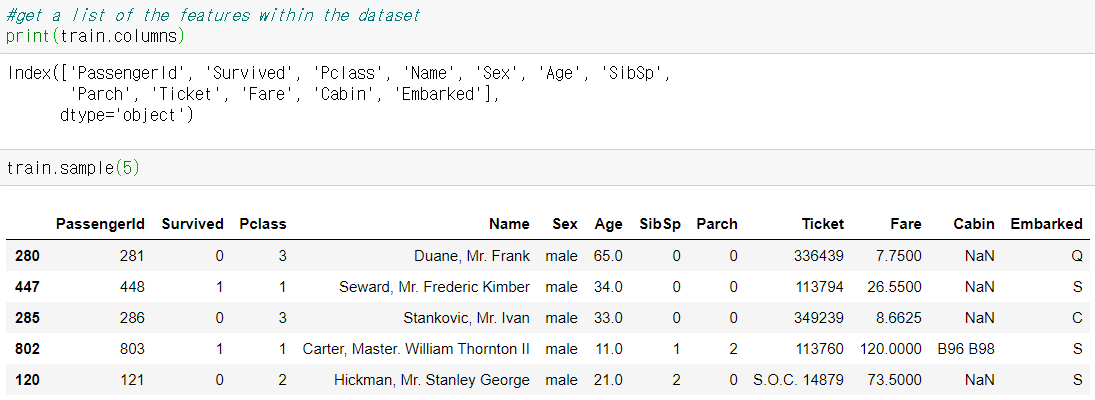
describe와 sample을 통해 알 수 있는 것
*Numerical Features
| Type | Remarks | |
| Age | float, continuous | |
| Fare | float, continuous | |
| SibSp | int, discreate | 함께 탑승한 형제or 배우자 수 |
| Parch | int ,discreate | 함께 탑승한 부모 or 자녀 수 |
*Categorical Features
| Type | Remarks | |
| Survived | int, binary? | |
| Sex | string, binary? | |
| Embarked | string | 출발지 |
| Pclass | int | 승객 등급 |
*Alphanumerical Features
| Type | Remarks | |
| Ticket | string | |
| Cabin | string | 객실 |
*Observation
Training set에는 총 891명의 승객이 있다.
Age 특성은 19.8%정도의 결측값을 가지고있다. age 특성은 생존 확률에 큰 영향을 줄 것이라 생각되니 최대한 빈칸을 채워야 한다.
Cabin 특성은 77.1%정도의 결측값을 가지고있다. 복원하기에는 결측값이 너무 많으므로 버려도 됨.
Embarked 특성은 0.22%정도의 결측값을 가지고있다. 이는 무시해도 될 것 같음.
#각 열의 결측값 개수 확인
print(pd.isnull(train).sum())
*Prediction
'Sex' : 'female'이 살아남을 확률이 더 높다.
'SibSp/Parch' : 혼자 떠난 사람들이 살아남을 확률이 더 높다.
'Age' : 어린 아이들이 살아남을 확률이 더 높다.
'Pclass' : 부유층들이 살아남을 확률이 더 높다.
3)Data Visualization
*Sex Feature
#draw a bar plot of survival by sex
sns.barplot(x="Sex", y="Survived", data=train)

#print percentages of females vs. males that survived
print("Percentage of female who survived: ", train["Survived"][train["Sex"] == 'female'].value_counts(normalize = True)[1]*100)
print("Percentage of male who survived : ", train["Survived"][train["Sex"] == 'male'].value_counts(normalize = True)[1]*100)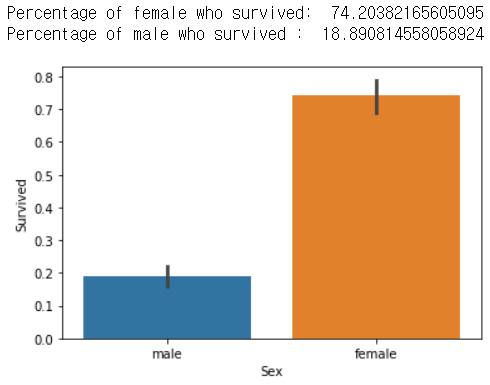
예측한 것 처럼 female이 살아남은 확률이 높다. 성별은 예측하는 데에 있어서 중요한 특징이다.
*Pclass Feature
#draw a bar of survival by Pclass
sns.barplot(x="Pclass", y="Survived", data=train)

#print percentage of people by Pclass that survived
print("Percentage of Pclass = 1 who survived : ", train["Survived"][train["Pclass"] == 1].value_counts(normalize = True)[1]*100)
print("Percentage of Pclass = 2 who survived : ", train["Survived"][train["Pclass"] == 2].value_counts(normalize = True)[1]*100)
print("Percentage of Pclass = 3 who survived : ", train["Survived"][train["Pclass"] == 3].value_counts(normalize = True)[1]*100)
예측대로 부유층들(등급이 높은 사람들)이 살아남은 확률이 높다.
*SibSp Feature
sns.barplot(x="SibSp", y="Survived", data=train)

print("Percentage of SibSp = 0 who survived : ", train["Survived"][train["SibSp"] == 0].value_counts(normalize = True)[1]*100)
print("Percentage of SibSp = 1 who survived : ", train["Survived"][train["SibSp"] == 1].value_counts(normalize = True)[1]*100)
print("Percentage of SibSp = 2 who survived : ", train["Survived"][train["SibSp"] == 2].value_counts(normalize = True)[1]*100)
print("Percentage of SibSp = 3 who survived : ", train["Survived"][train["SibSp"] == 3].value_counts(normalize = True)[1]*100)
print("Percentage of SibSp = 4 who survived : ", train["Survived"][train["SibSp"] == 4].value_counts(normalize = True)[1]*100)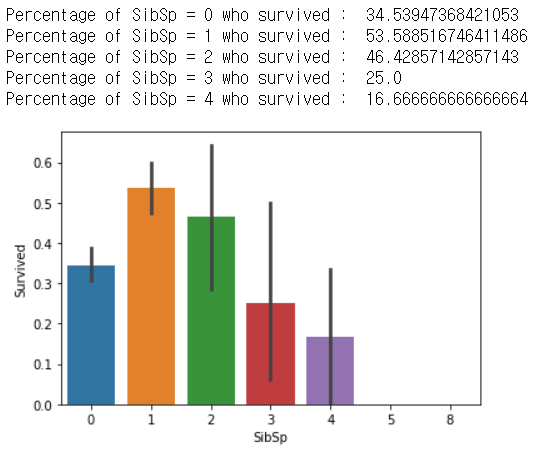
일반적으로, 많은 형제 자매나 배우자와 함께한 사람들은 살아남은 확률이 낮다. 하지만 예측과는 다르게 혼자 여행한 사람들은 1명 혹은 2명과 함께한 사람보다 살아남을 확률이 낮다.
*Parch Feature
sns.barplot(x="Parch", y="Survived", data=train)
plt.show
부모나 자식들이 4명보다 적은 사람들은 4명 이상인 사람들보다 살아남은 확률이 높다.
*Age Feature
#sort the ages into logical categories
train["Age"] = train["Age"].fillna(-0.5)
test["Age"] = test["Age"].fillna(-0.5)
bins = [-1, 0, 5, 12, 18, 24, 35, 60, np.inf]
labels = ['Unknown', 'Baby', 'Child', 'Teenager', 'Student', 'Young Adult', 'Adult', 'Senior']
train['AgeGroup'] = pd.cut(train["Age"], bins, labels = labels)
test['AgeGroup'] = pd.cut(test["Age"], bins, labels = labels)

#draw a bar plot of Age vs. survival
sns.barplot(x="AgeGroup", y="Survived", data=train)
plt.show()
아기들이 다른 그룹들보다 살아남은 확률이 높다.
*Cabin Feature
Cabin number이 기록되어있는 사람들은 부유층일 것이라는 아이디어 > 살아남을 확률이 높을것
train["CabinBool"] = (train["Cabin"].notnull().astype('int'))
test["CabinBool"] = (test["Cabin"].notnull().astype('int'))

#calculate percentages of CabinBool vs. survived
print("Percentage of CabinBool = 1 who survived : ", train["Survived"][train["CabinBool"] == 1].value_counts(normalize = True)[1]*100)
print("Percentage of CabinBool = 0 who survived : ", train["Survived"][train["CabinBool"] == 0].value_counts(normalize = True)[1]*100)

#draw a bar plot of CabinBool vs. survival
sns.barplot(x="CabinBool", y="Survived", data=train)
plt.show()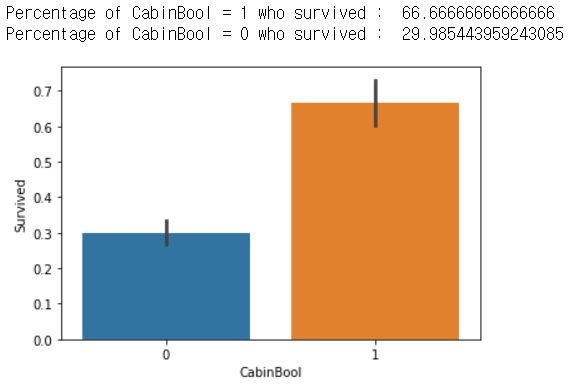
예상대로, 객실번호가 기록된 사람들은 살아남은 확률이 높다.
4)Cleaning Data
결측값과 필요없는 정보를 정리해야한다.

"AgeGroup"이나 "CabinBool"처럼 추가된 변수도 있기 때문에 다시 test set을 describe해보면
- 총 418명의 승객이 있다.
- "Fare"에는 하나의 결측값이 있다.
- 20.5%정도의 "Age" feature이 결측값. 채워야한다(이건 어떻게 아는건지 모르겠다.)
*Cabin Feature, Ticket Feature
train = train.drop(['Cabin'], axis = 1)
test = test.drop(['Cabin'], axis = 1)

train = train.drop(['Ticket'], axis = 1)
test = test.drop(['Ticket'], axis = 1)
Cabin feature에서 파생된 CabinBool이 필요하지 Cabin은 별 쓸모가 없다. > drop
Ticket feature도 쓸모 없을 것 같음 > drop
*Embarked Feature
print("Number of people embarking in Southampton (S) : ")
southampton = train[train["Embarked"] == "S"].shape[0]
print(southampton)

print("Number of people embarking in Cherbourg (C) : ")
cherbourg = train[train["Embarked"] == "C"].shape[0]
print(cherbourg)

print("Number of people embarking in Queenstown (Q) : ")
queenstown = train[train["Embarked"] == "Q"].shape[0]
print(queenstown)
대다수가 "Southampton"이기 때문에 결측값도 "S"로 채우자
train = train.fillna({"Embarked": "S"})
*Age Feature
Age feature의 결측값을 채워야한다. 결측값이 많기 때문에, 'Embarked"에서 했던 것 처럼 같은 값으로 채우는 것은 비논리적이다.
방법을 찾아보자
#create a combine group of both datasets
combine = [train, test]

#extract a title for each Name in the train and test datasets
for dataset in combine:
    dataset['Title'] = dataset.Name.str.extract(' ([A-Za-z]+)\.', expand=False)

pd.crosstab(train['Title'], train['Sex'])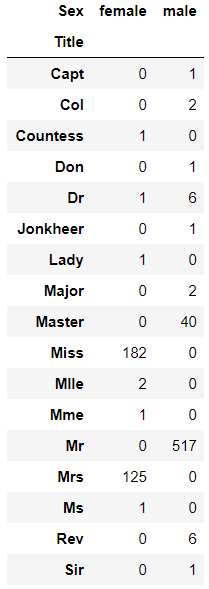
영어권은 Mrs나 Miss처럼 이름에 붙은 호칭? 경칭?을 보면 성별을 유추할 수 있다.
for dataset in combine:
    dataset['Title'] = dataset['Title'].replace(['Lady' ,'Capt', 'Col', 'Don', 'Dr', 'Major', 'Rev', 'Jonkheer', 'Dona'], 'Rare')
    dataset['Title'] = dataset['Title'].replace(['Countess', 'Lady', 'Sir'], 'Royal')
    dataset['Title'] = dataset['Title'].replace('Mlle', 'Miss')
    dataset['Title'] = dataset['Title'].replace('Ms', 'Miss')
    dataset['Title'] = dataset['Title'].replace('Mme', 'Mrs')

train[['Title', 'Survived']].groupby(['Title'], as_index=False).mean()
Lady가 왜 두 번인지는 모르겠다...빼도 결과는 같던데 일단은 넣어둠
title_mapping = {"Mr": 1, "Miss": 2, "Mrs": 3, "Master": 4, "Royal": 5, "Rare": 6}
for dataset in combine:
    dataset['Title'] = dataset['Title'].map(title_mapping)
    dataset['Title'] = dataset['Title'].fillna(0)

train.head()
간단한 맵핑, 열을 dict class에 map해주면 맵핑이 된다는 것만 알면 될 것 같음
#타이틀이 n인 행들의 AgeGroup열에서 최빈값 구하기
#"Mr": 1, "Miss": 2, "Mrs": 3, "Master": 4, "Royal": 5, "Rare": 6
mr_age = train[train["Title"] == 1]["AgeGroup"].mode() #Young Adult
miss_age = train[train["Title"] == 2]["AgeGroup"].mode() #Student
mrs_age = train[train["Title"] == 3]["AgeGroup"].mode() #Adult
master_age = train[train["Title"] == 4]["AgeGroup"].mode() #Baby
royal_age = train[train["Title"] == 5]["AgeGroup"].mode() #Adult
rare_age = train[train["Title"] == 6]["AgeGroup"].mode() #Adult

age_title_mapping = {1: "Young Adult", 2: "Student", 3: "Adult", 4: "Baby", 5: "Adult", 6: "Adult"}

for x in range(len(train["AgeGroup"])):
    if train["AgeGroup"][x] == "Unknown":
        train["AgeGroup"][x] = age_title_mapping[train["Title"][x]]

for x in  range(len(test["AgeGroup"])):
    if test["AgeGroup"][x] == "Unknown":
        test["AgeGroup"][x] = age_title_mapping[test["Title"][x]]
호칭별 최빈값으로 "Age"의 결측값을 채우는 작업
Master라는 호칭은 어린 남자아이를 정중하게 부를때 쓰는 호칭이라고 한다...
#map each Age value to a numerical value
age_mapping = {'Baby': 1, 'Child': 2, 'Teenager': 3, 'Student': 4, 'Young Adult': 5, 'Adult': 6, 'Senior': 7}
train['AgeGroup'] = train['AgeGroup'].map(age_mapping)
test['AgeGroup'] = test['AgeGroup'].map(age_mapping)

train = train.drop(['Age'], axis = 1)
test = test.drop(['Age'], axis = 1)
*Name Feature
train = train.drop(['Name'], axis = 1)
test = test.drop(['Name'], axis = 1)
호칭을 추출했던 Name feature 드랍
*Sex Feature
sex_mapping = {"male": 0, "female": 1}
train['Sex'] = train['Sex'].map(sex_mapping)
test['Sex'] = test['Sex'].map(sex_mapping)

train.head()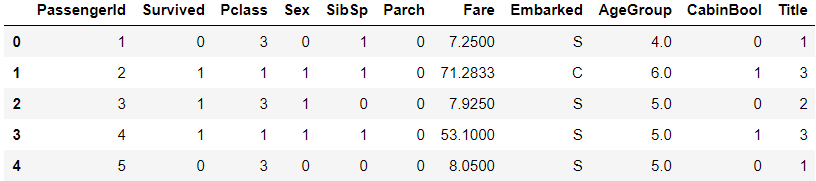
성별도 0 or 1로 맵핑
*Embarked Feature
embarked_mapping = {"S": 1, "C": 2, "Q": 3}
train['Embarked'] = train['Embarked'].map(embarked_mapping)
test['Embarked'] = test['Embarked'].map(embarked_mapping)

train.head()
출발지도 맵핑
*Fare Feature
Fare feature도 논리적인 그룹으로 분리한 다음 결측값을 채우면 됨
#각 Pclass의 fare 평균을 구해서 결측값 채우는 작업
for x in range(len(test['Fare'])):
    if pd.isnull(test['Fare'][x]):
        pclass = test["Pclass"][x]
        #Fare이 결측값인 pclass의 평균 Fare을 구해서 반올림
        test["Fare"][x] = round(train[train["Pclass"] == pclass]["Fare"].mean(), 4)

#map Fare values into groups of numerical values
train['FareBand'] = pd.qcut(train['Fare'], 4, labels = [1, 2, 3, 4])
test['FareBand'] = pd.qcut(test['Fare'], 4, labels = [1, 2, 3, 4])

train = train.drop(['Fare'], axis = 1)
test = test.drop(['Fare'], axis = 1)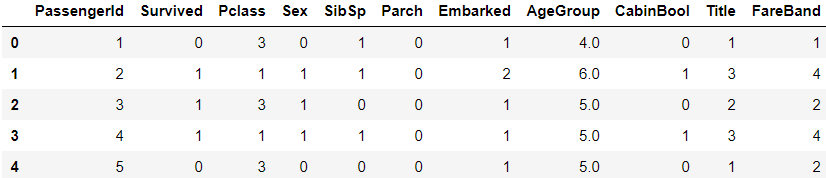

5)Choosing the Best Model
*Splitting Training Data
다른 모델에서의 정확도를 테스트하기 위해 training data에서 일부(22%)를 떼어낼 것 -> overfitting 방지?
from sklearn.model_selection import train_test_split

predictors = train.drop(['Survived', 'PassengerId'], axis=1)
target = train["Survived"]
x_train, x_val, y_train, t_val = train_test_split(predictors, target, test_size = 0.22, random_state = 0)
drop은 해당 행이나 열을 없앤 df를 리턴하는 것이지 drop한 df에 영향을 주진 않는다.
+ test.drop(['Fare'], axis=1, inplace=True) inplace옵션에 True를 주면 영향을 줌
*Testing Different Models
밑의 모델들을 가지고 테스트 할 것
-Gaussian Naive Bayes
-Logistic Regression
-Support Vector Machine
-Perceptron
-Decision Tree Classifier
-Random Forest Classifier
-KNN or K-Nearest Neighbors
-Stochastic Gradient Descent
-Gradient Boosting Classifier
각 모델마다 모델을 구현하고 training set의 80%를 가지고 학습 후 20%로 정확도를 확인할 것이다.
#Gaussian Naive Bayes
from sklearn.naive_bayes import GaussianNB
from sklearn.metrics import accuracy_score

gaussian = GaussianNB()
gaussian.fit(x_train, y_train)
y_pred = gaussian.predict(x_val)
acc_gaussian = round(accuracy_score(y_pred, y_val) * 100, 2)
print(acc_gaussian)
>> 78.68
#Logistic Regression
from sklearn.linear_model import LogisticRegression
logreg = LogisticRegression()
logreg.fit(x_train, y_train)
y_pred = logreg.predict(x_val)
acc_logreg = round(accuracy_score(y_pred, y_val) * 100, 2)
print(acc_logreg)
>> 79.70#Support Vector Machines
from sklearn.svm import SVC
svc = SVC()
svc.fit(x_train, y_train)
y_pred = svc.predict(x_val)
acc_svc = round(accuracy_score(y_pred, y_val)* 100, 2)
print(acc_svc)
>> 82.74#Linear SVC
from sklearn.svm import LinearSVC
linear_svc = LinearSVC()
linear_svc.fit(x_train, y_train)
y_pred = linear_svc.predict(x_val)
acc_linear_svc = round(accuracy_score(y_pred, y_val) * 100, 2)
print(acc_linear_svc)
>> 78.68#Perceptron
from sklearn.linear_model import Perceptron
perceptron = Perceptron()
perceptron.fit(x_train, y_train)
y_pred = perceptron.predict(x_val)
acc_perceptron = round(accuracy_score(y_pred, y_val) * 100, 2)
print(acc_perceptron)
>> 78.68#Decision Tree
from sklearn.tree import DecisionTreeClassifier
decisiontree = DecisionTreeClassifier()
decisiontree.fit(x_train, y_train)
y_pred = decisiontree.predict(x_val)
acc_decisiontree = round(accuracy_score(y_pred, y_val) * 100, 2)
print(acc_decisiontree)
>> 80.71#Ramdom Forest
from sklearn.ensemble import RandomForestClassifier
randomforest = RandomForestClassifier()
randomforest.fit(x_train, y_train)
y_pred = randomforest.predict(x_val)
acc_randomforest = round(accuracy_score(y_pred, y_val) * 100, 2)
print(acc_randomforest)
>> 84.77#KNN or k-Nearest Neighbors
from sklearn.neighbors import KNeighborsClassifier
knn = KNeighborsClassifier()
knn.fit(x_train, y_train)
y_pred = knn.predict(x_val)
acc_knn = round(accuracy_score(y_pred, y_val) * 100, 2)
print(acc_knn)
>> 77.66#Stochastic Gradient Descent
from sklearn.linear_model import SGDClassifier
sgd = SGDClassifier()
sgd.fit(x_train, y_train)
y_pred = sgd.predict(x_val)
acc_sgd = round(accuracy_score(y_pred, y_val) * 100, 2)
print(acc_sgd)
>> 79.19#Gradient Boosting Classifier
from sklearn.ensemble import GradientBoostingClassifier
gbk = GradientBoostingClassifier()
gbk.fit(x_train, y_train)
y_pred = gbk.predict(x_val)
acc_gbk = round(accuracy_score(y_pred, y_val) * 100, 2)
print(acc_gbk)
>> 84.77
각 모델들의 정확도를 비교해보자
models = pd.DataFrame({
    'Model': ['Support Vector Machines', 'KNN', 'Logistic Regression',
              'Random Forest', 'Naive Bayes', 'Perceptron', 'Linear SVC',
              'Decision Tree', 'Stochastic Gradient Descent', 'Gradient Boosting Classifier'],
    'Score': [acc_svc, acc_knn, acc_logreg,
              acc_randomforest, acc_gaussian, acc_perceptron,acc_linear_svc, acc_decisiontree,
              acc_sgd, acc_gbk]})
models.sort_values(by='Score', ascending=False)
Random forest와 Gradient Boosting Classifier이 84.77로 score가 같은데 지금은 따라 가는 거니까 후자로 테스트를 해보자.
시간이 된다면 Random Forest로도 제출해볼것
6)Creating Submission File
*Gradient Boosting Classifier
#set ids as PassengerId and predict survival
ids = test['PassengerId']
predictions = gbk.predict(test.drop('PassengerId', axis = 1))

#set the output as a dataframe and convert to csv file named submission.csv
output = pd.DataFrame({ 'PassengerId': ids, 'Survived': predictions})
output.to_csv('submission.csv', index=False)
남녀로 구분해서 한 것과 비교하면 score가 0.2도 오르지 않았다... 생각보다 Score가 눈에 띄게 오르진 않는 것 같다.
Random Forest로도 해보자 모델을 바꾸는 것은 얼마 걸리지 않을듯
*Random Forest
#set ids as PassengerId and predict survival
ids = test['PassengerId']
predictions = randomforest.predict(test.drop('PassengerId', axis = 1))

#set the output as a dataframe and convert to csv file named submission.csv
output = pd.DataFrame({ 'PassengerId': ids, 'Survived': predictions})
output.to_csv('submission.csv', index=False)
한줄만 바꾸니 된다.
Random forest는 남녀로 구분하는 것 보다 정확도가 떨어진다.. 뭐가 문제일까
우선 캐글의 기본적인 흐름을 이해할 수 있었다.
1. 문제 이해하기
2. 데이터 유형이나 구조 확인 > 특징 기록
3. 데이터 시각화하기 > 특징 기록
4. 기록한 특징을 바탕으로 데이터 전처리(결측값 채우거나 필요 없는 feature 걸러내기)
5. 적절한 모델 선택하기
6. 제출하고 계속해서 개선(반복작업..)
아직 기본적인 코드라 그런걸 수도 있겠지만, sklearn에 모델들이 다 있어서 생각했던 것 보다 코드가 복잡하진 않았다. 아직까지 pandas나 다른 툴들을 어떻게 활용할 지도 모르겠고 option에 대한 이해도 필요할 것 같다. 그리고 사용했던 sklearn의 모델들에 대한 정리도 한번 해야겠다.
배운것
jupyter notebook에서 !를 붙이면 커맨드 창에서 명령하는 것처럼 할 수 있음 ex) !pip install seaborn
DataFrame.value_counts(normalize = True)옵션을 주면 횟수대신 비율을 리턴.
pandas.cut(x, bins, labels) :
bins = [-1, 0, 5, 12, 18, 24, 35, 60, np.inf]
labels = ['Unknown', 'Baby', 'Child', 'Teenager', 'Student', 'Young Adult', 'Adult', 'Senior']
train['AgeGroup'] = pd.cut(train["Age"], bins, labels = labels)
bins는 int, sequence of scalars, of intevalindex가 될 수 있는데 위의 경우에는 sequence of scalars가 쓰인 것 같음
-1<='Unknown'<0, 0<='Baby'<5 ... 이런식으로 continuous -> categorical로 바꿀때 사용.
crosstab(rows, columns) : 교차표 생성, 디폴트라면 frequence 리턴
pandas.Series.str.extract : 문자열 추출, 유용할 것 같음 + 정규식도 알아야 할 것 같음
data set의 열을 dict class에 map해주면 맵핑이 된다
pandas.DataFrame.mode() : 최빈값 구하기 axis=0이면 열, axis=1이면 행, 디폴트는 0
array.map(dict) 식으로 맵핑
pandas.qcut(x, q, labels) : x를 q등분해서 레이블 씌우는거?(정확히는 이해하지 못함)
pandas.DataFrame.drop() : 해당 rows나 columns를 제거한 df를 리턴.